Skip to content

Website, booking and billing for independent yoga and Pilates studios

Get your own booking website & studio management live today

Type your studio’s name. If you have a website already, give us its address and we will bring your colours across. Nothing is saved until you say so.

Classes

Free for 7 days, then US$179 a month, everything included. No contract — cancel in one click.

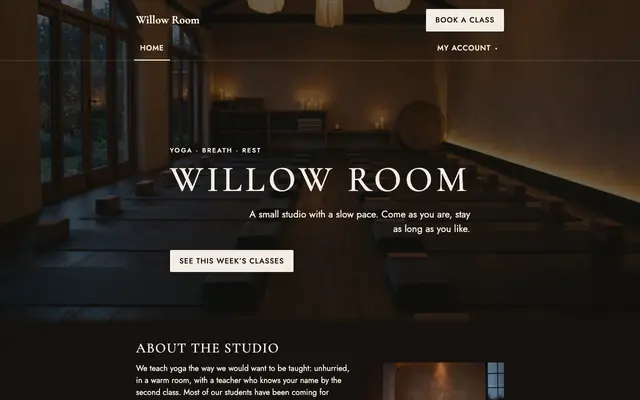
  • Dark and warm. A photograph edge to edge, spaced capitals, brass buttons.Ember
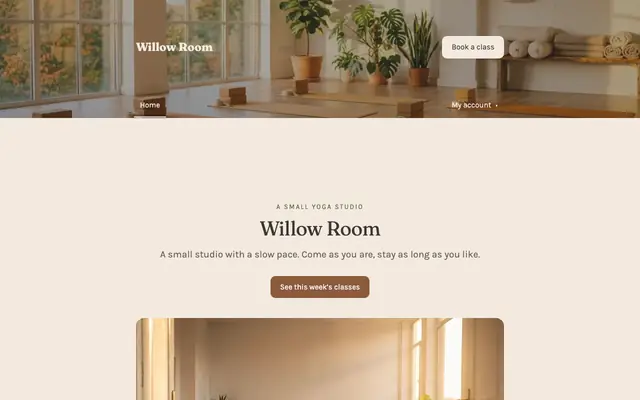
  • Calm and sunlit. Soft serif headings, a cream page, plenty of space.Haven
  • Bright and precise. One clean sans, crisp cards, the reformer room in daylight.Form
  • Bold and loud. Condensed capitals, high contrast, photographs full of effort.Pulse
Four templates to start from. Pick one after you type your name, and change it whenever you like.

Demo studio

Try it on a demo studio.

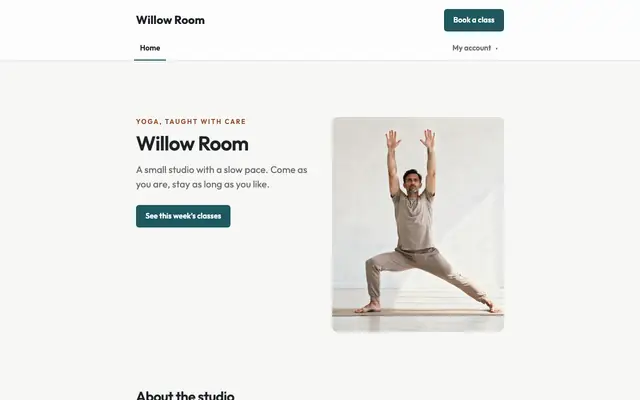
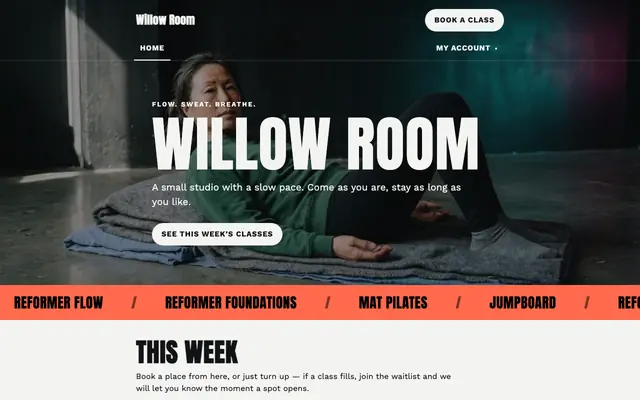
Willow Room is a demo studio. Open it, read its pages and book a class. No sign-up, and nothing you enter is kept past tonight.

willowroom.scrunchio.com
Willow Room’s website.
The same site, on a phone.
Willow Room, live. The schedule needs no sign-in; booking a class signs you in by email.

Open Willow RoomSee its scheduleTry booking a class

  • The website, schedule and booking your studio gets, in one of the four templates.
  • The classes, teachers and passes a new studio starts with, ready for you to change.
  • Book a class, cancel it, book another. The schedule resets every morning.

Made for the way yoga and Pilates studios sell.

Not a gym system with a lotus on it. Two kinds of studio, the things each one kept a spreadsheet for, at one price.

If you run a yoga studio

  • Drop-ins, class packs and memberships, and the right pass is used for every booking. Your students never pick between their own passes.
  • Work-trade and energy-exchange passes with a reason on record, and comps that do not quietly renew.
  • Workshops and teacher training sold by conversation, with an enquiry form instead of a buy button.
  • Waivers signed at the first booking and versioned, so you can show what someone agreed to.

If you run a Pilates or reformer studio

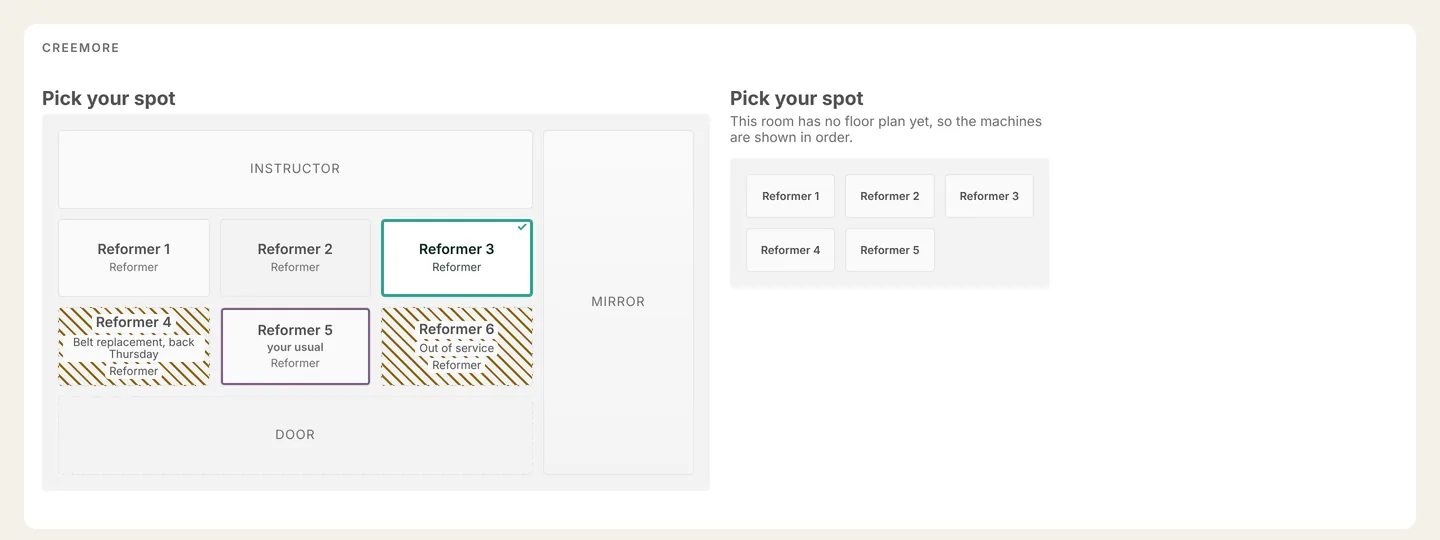
  • Students choose their reformer on a plan of your room, and regulars are offered the one they used last time.
  • Take a machine out of service and the class shrinks with it, instead of overbooking.
  • Privates booked against each instructor’s real availability, with buffers either side.
  • Spot booking is included at the one price.
See the room plan

Start free trial

What stops landing on you.

  • No more double-booked last spots

    Two students tapping Book on the last place get one booking and one waitlist spot. When someone cancels, the waitlist moves up on its own.

  • Reminders that send themselves

    Email reminders before every class, from your studio’s name, at the times you choose. A moved or cancelled class never sends a stale one.

  • Teachers see who is coming

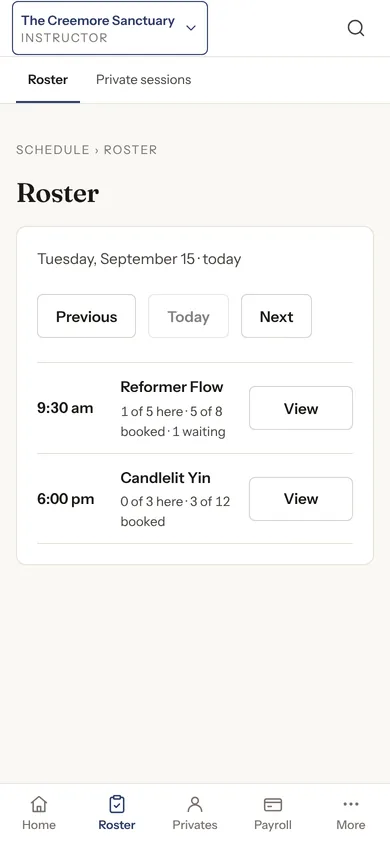
    Today’s roster on the instructor’s phone, with a private safety note for the person in front of them. Seen by the people teaching, and no one else.

  • Payday on one screen

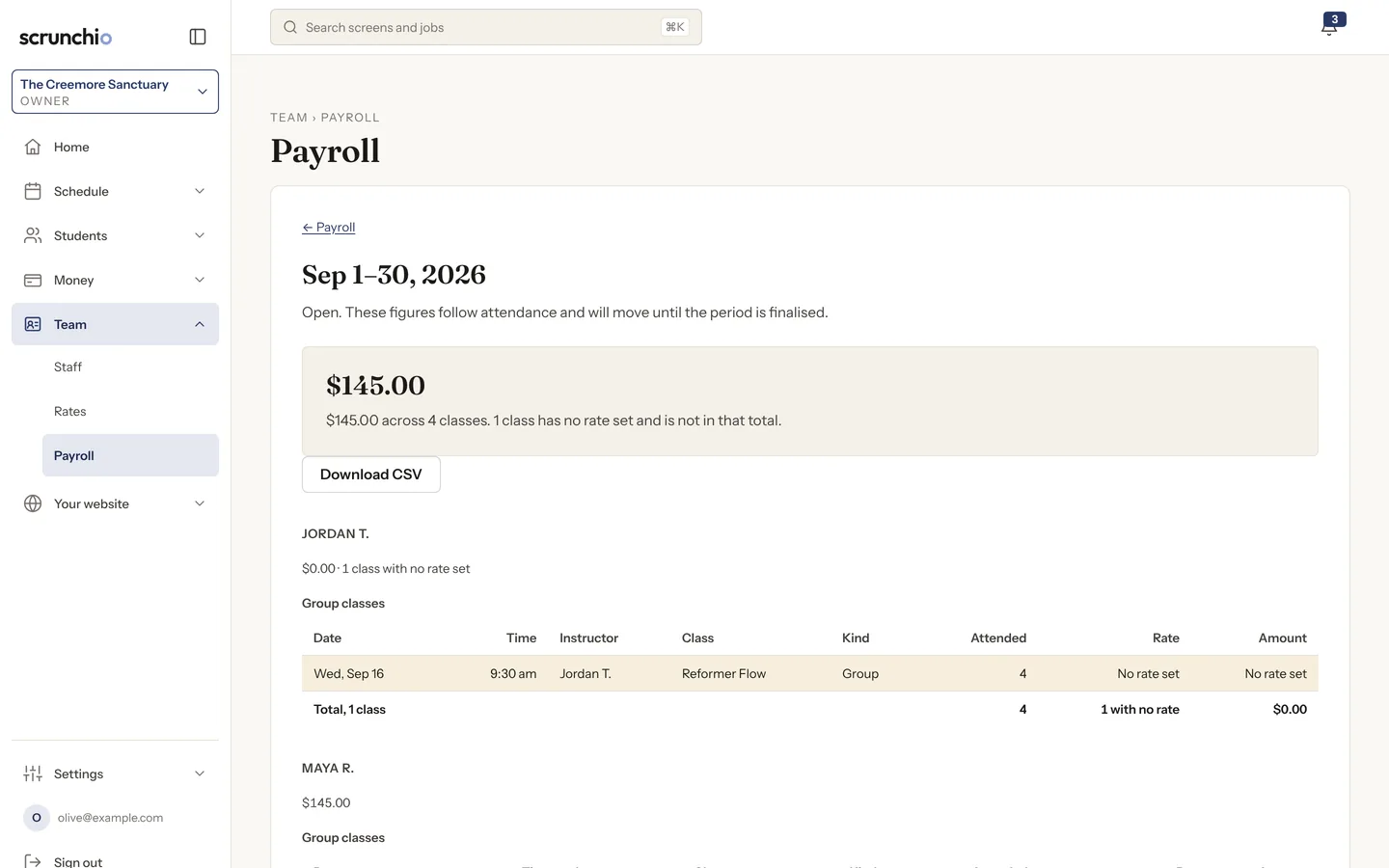
    What you owe each teacher for the period, per class, per head or hourly. Any unpriced class is flagged rather than counted as zero. Export it as CSV.

Start free trial

The price.

US$179 a month, per studio

One flat fee, in US dollars. It does not rise per student, per booking, per location or per teacher, and never as a share of what you sell.

Contract
None. Month to month, cancel whenever.
Minimum term
None. No 90-day minimum, no auto-renewing year.
Setup fee
None.
Card processing
Stripe’s published rate, paid to Stripe. We add nothing.
Data export
Free, unlimited, forever, including after you leave.
Moving in
Done by us, as part of setting you up.
Payoutyour Stripe accountpaid to you
Charged to your studentsCA$12,000
Card processing, Stripe’s rate stripe.com2.9% + CA$0.30
Scrunchio’s shareCA$0
In Canadian dollars, an example studio at Stripe's Canadian rate. Your students pay your Stripe account, and nothing comes to us.

Start free trial

What’s included.

All of it, at the one price.

Classes, booking and the waitlist

Your week, your rooms, your teachers. Two students tapping Book on the last place get one booking and one waitlist spot, and a cancellation moves the list up on its own.

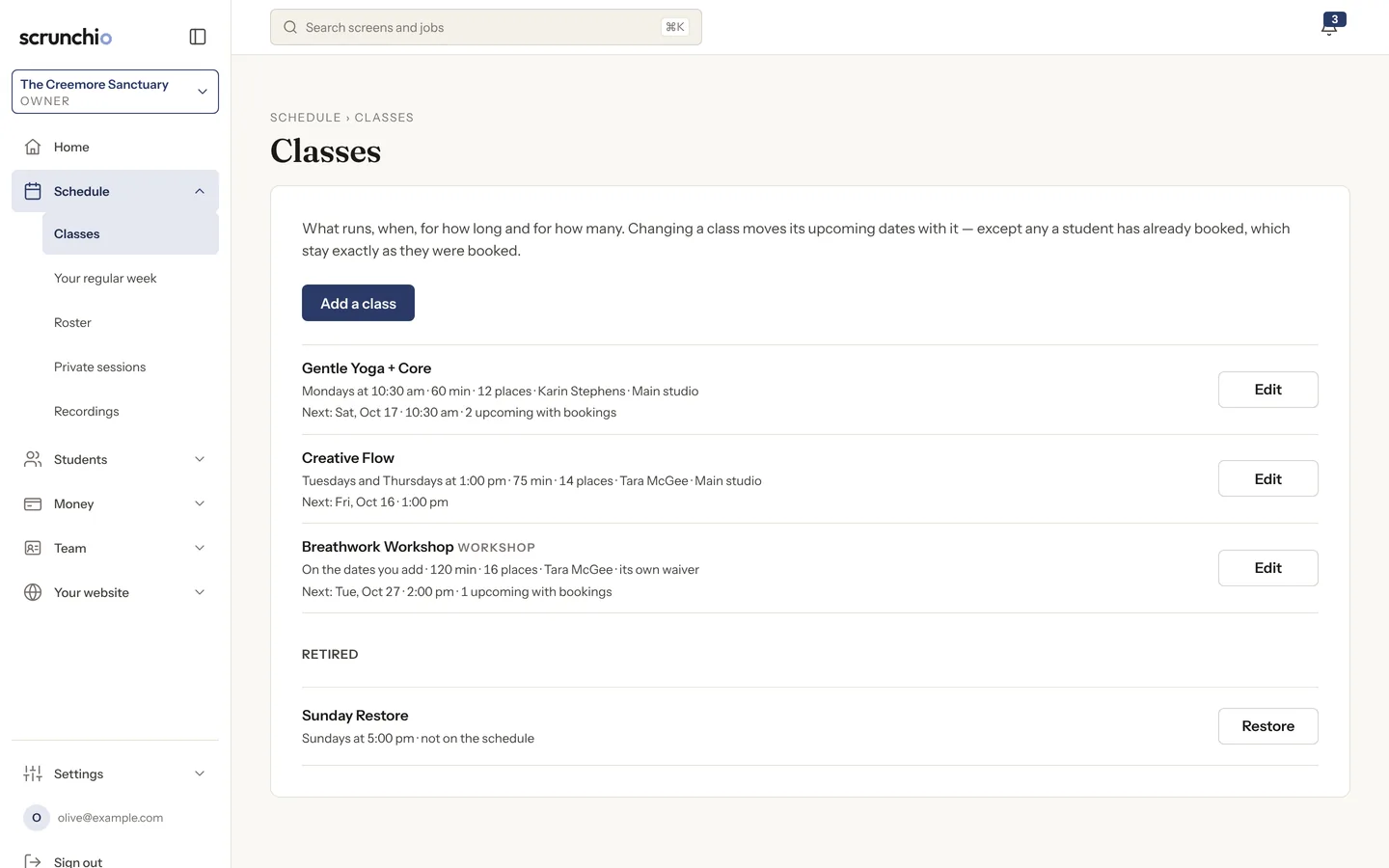
  1. Every class with its time, length, places and teacher.
  2. Change a class and its coming dates follow; anyone already booked stays as they were.
  3. A workshop carries its own waiver.
The Classes screen of the admin: each class with its day, time, length, places and teacher, and an Edit button.

Passes and prices, sold into your own Stripe

Drop-ins, class packs and memberships, priced with tax included as students see them. Checkout, the cart and renewals run on your own Stripe account, and the money goes to you.

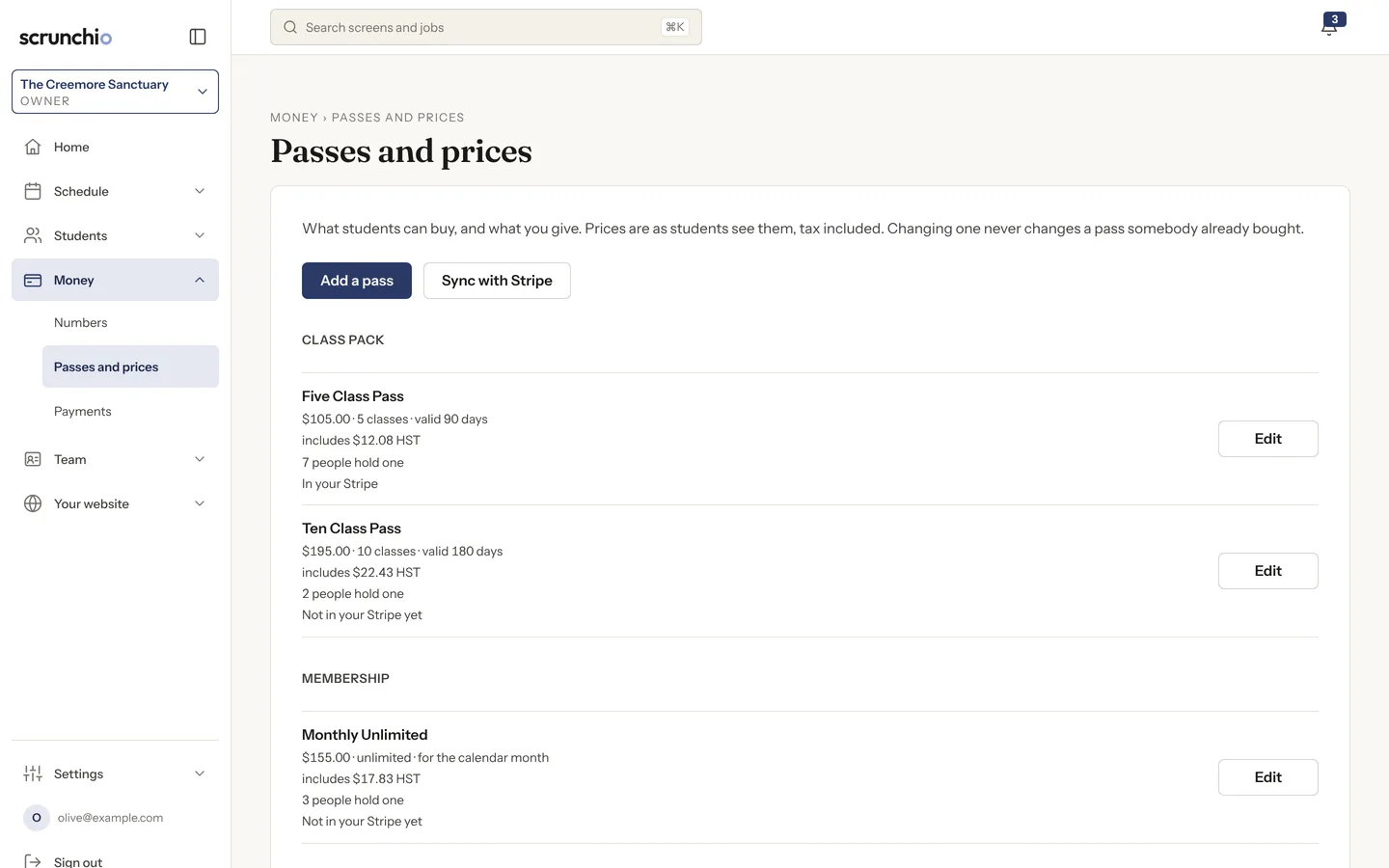
  1. Each pass shows who holds it and whether it is in your Stripe yet.
  2. Sync with Stripe keeps your prices in step.
  3. A refund issued in Stripe reverses the credits it paid for.
The Passes and prices screen: a five-class pass, a ten-class pass and a monthly unlimited membership, each with its price, tax and how many people hold one.

Teaching and payday

Each teacher opens today’s roster on their phone, with a private safety note for the person in front of them. At the end of the period, what you owe each teacher is on one screen.

  1. Per class, per head or hourly, with a class that has no rate flagged rather than counted as zero.
  2. Finalising a period freezes its figures.
  3. The roster, on the teacher’s phone: who is coming, and the note only they can see.
The Payroll screen for one pay period: the total owed, a Download CSV button, and each teacher’s classes with attendance, rate and amount.The same screen on a phone.

Your website, and you can change it

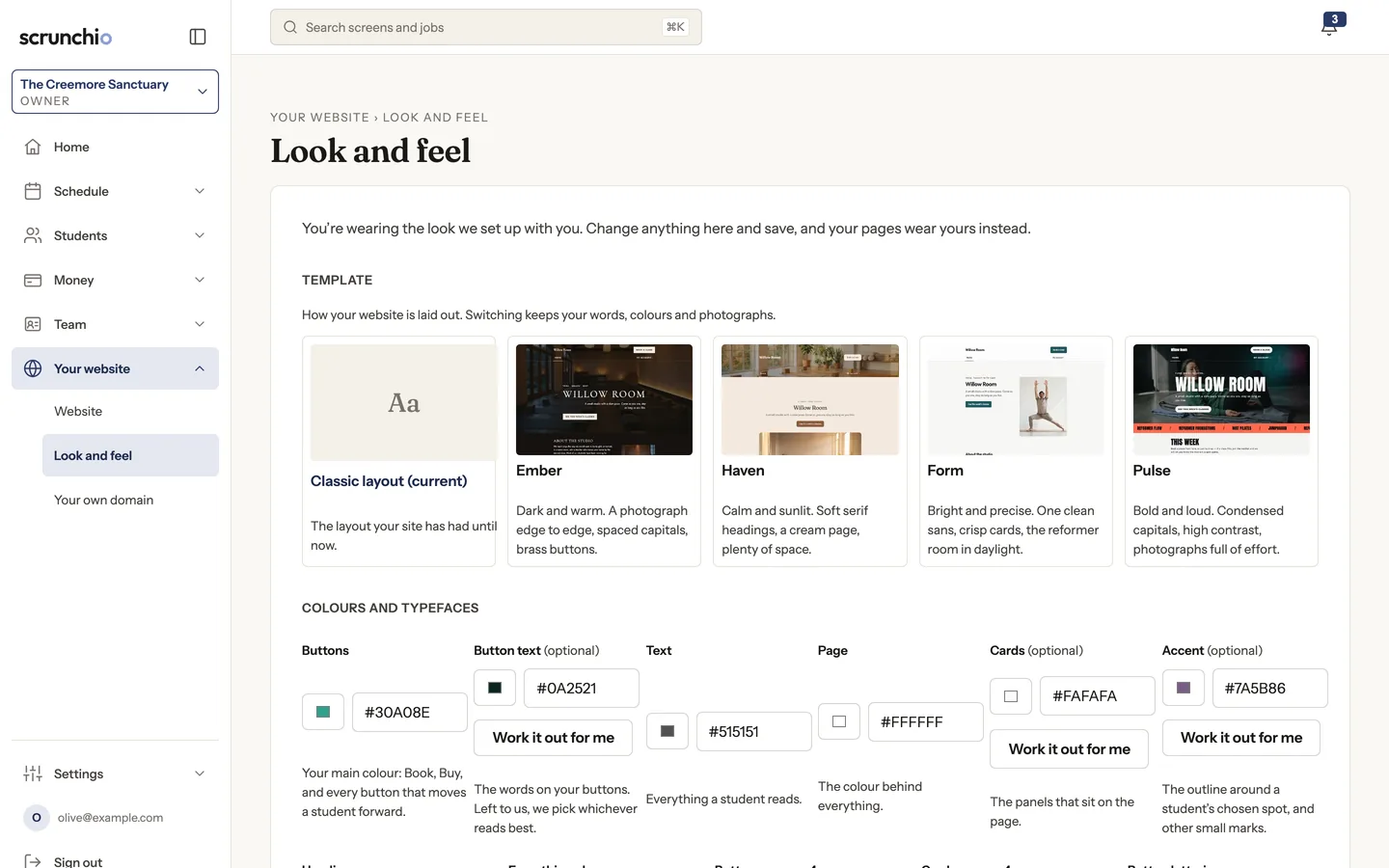
The pages around booking are yours to edit, in your words and your photographs. Pick a layout, set colours and typefaces, and see the result before you save.

  1. Switch layouts; your words, colours and photographs stay.
  2. Colours and typefaces with a live preview.
  3. Contrast is checked as you go, so nothing you choose leaves booking unreadable.
The Look and feel screen: five layouts to choose from, then colour pickers for buttons, text, page and cards, each with a Work it out for me button.

Reminders and messages, from your studio’s name

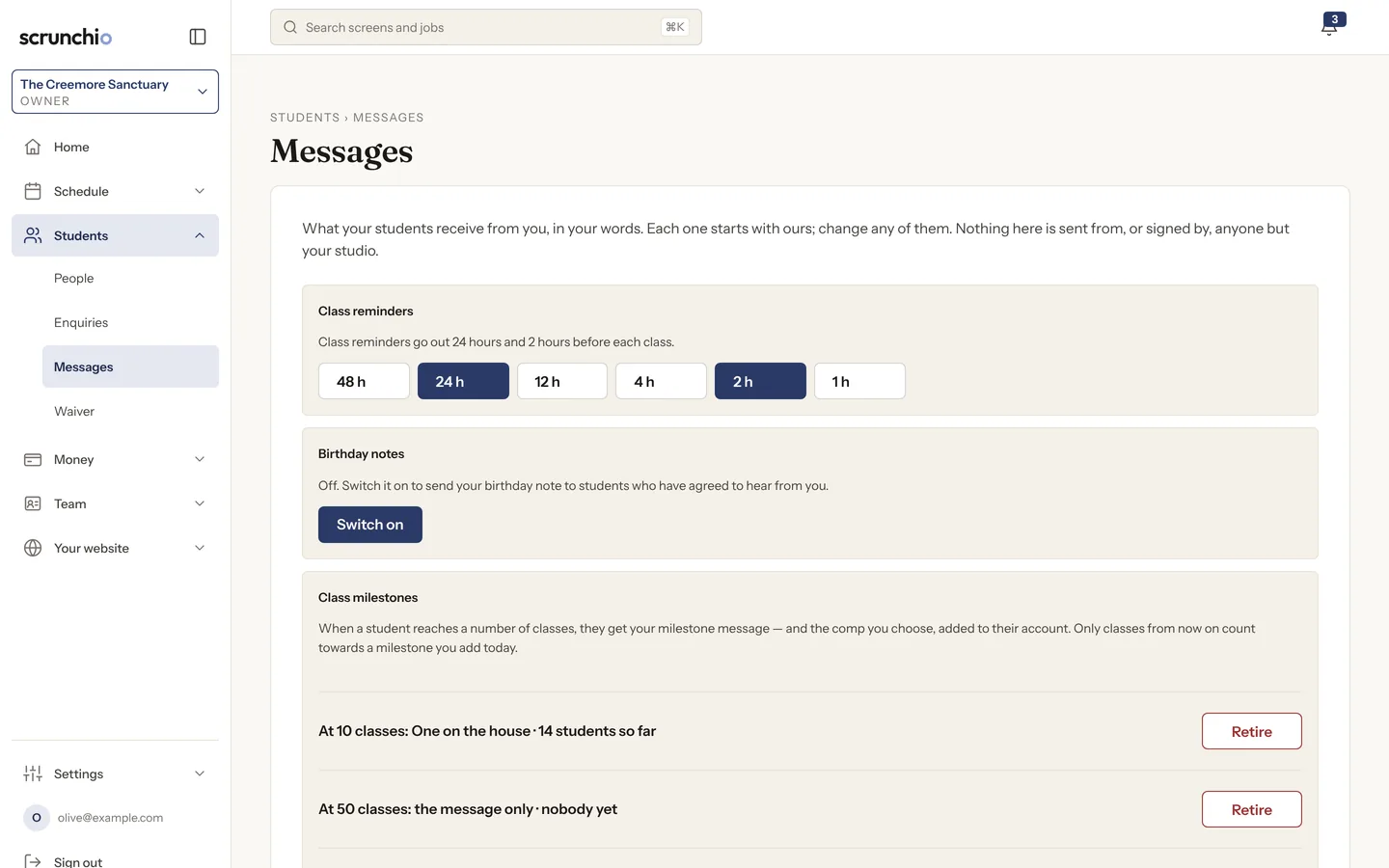
Class reminders, birthday notes and milestones, in your wording, to people who agreed to hear from you.

  1. Reminders 24 and 2 hours before by default, or the times you pick.
  2. Milestones at 10 and 50 classes, with the comp you choose.
  3. Every marketing email carries a one-click unsubscribe, and consent is kept per student.
The Messages screen: class reminders at 24 and 2 hours before, birthday notes switched off, and two class milestones with the comp each one gives.

Start free trial

Reformer studios: machines, not dropdowns.

Students pick their reformer on a plan of your room, and regulars are offered the one they used last time. Take a machine out of service and the class shrinks with it. Spot booking is included at the one price.

Start free trial

The spot picker a student sees: six reformers on a plan of the room with the instructor, mirror and door. One is chosen, one is marked as the student’s usual, two are out of service.

We move you in.

Done by us, as part of setting you up, with a report in front of you before anything goes live.

  1. A dry run first

    We import a copy of your records and send you a report: how many students, how many passes, how many credits, and every row that did not map. Nothing goes live until you have read it.

  2. Students, passes and balances

    A student who had seven classes left has seven classes left. Classes, teachers, passes and prices come from WordPress and WooCommerce; students and their passes from a spreadsheet.

  3. Your site, then the switch

    Your new site runs on a Scrunchio address while you check it. You move your domain when you are ready, and nothing goes down.

Plan your switch

How to leave.

Month to month. Go whenever you like, and take everything with you.

Cancel
One click, in your own admin. No phone call, no notice period.
Export
Everything, as CSV, whenever you want: students, bookings, attendance, passes, credit history, waivers and signatures. Free, including after you have gone.
Your Stripe
Stays yours. Your payment history, your customers and your payouts were never ours to hold.
Your domain
Stays yours. Point it wherever you like.

Questions owners ask.

Can students book from my Instagram link and from Google?

Yes. Your schedule has its own address on your own domain, so any link you share lands on it, and search engines read your pages like any other website.

What happens to a student who has booked the same class for three years?

Her record and the passes she still holds come across in the move, and the dry-run report shows you her row before anything goes live. She signs in with a link from your studio. No password, no app.

Do my students need an app?

No. They get a link from your studio, tap it, and they are in. It is a website that works on a phone.

My members are on autopay. What happens to their cards?

Stored cards do not move on their own yet. Before you switch we tell you whether your old platform will release them. If it will not, each member enters a card once, on your site.

What do you take from my card processing?

Nothing. You connect your own Stripe account, students pay you, and Stripe takes its published rate. We are not in between.

Is there a contract?

No. Month to month, cancel in one click, no minimum term, no notice period and no setup fee.

Can I leave and take my data?

Yes. Cancel in your admin, then export students, bookings, attendance, passes, credit history, waivers and signatures as CSV. Free, including after you have gone.
See your studio before you sign up.

Type your studio’s name and look at it on its own website. Nothing is saved until you say so.

Classes